
Ask Your Assets Anything
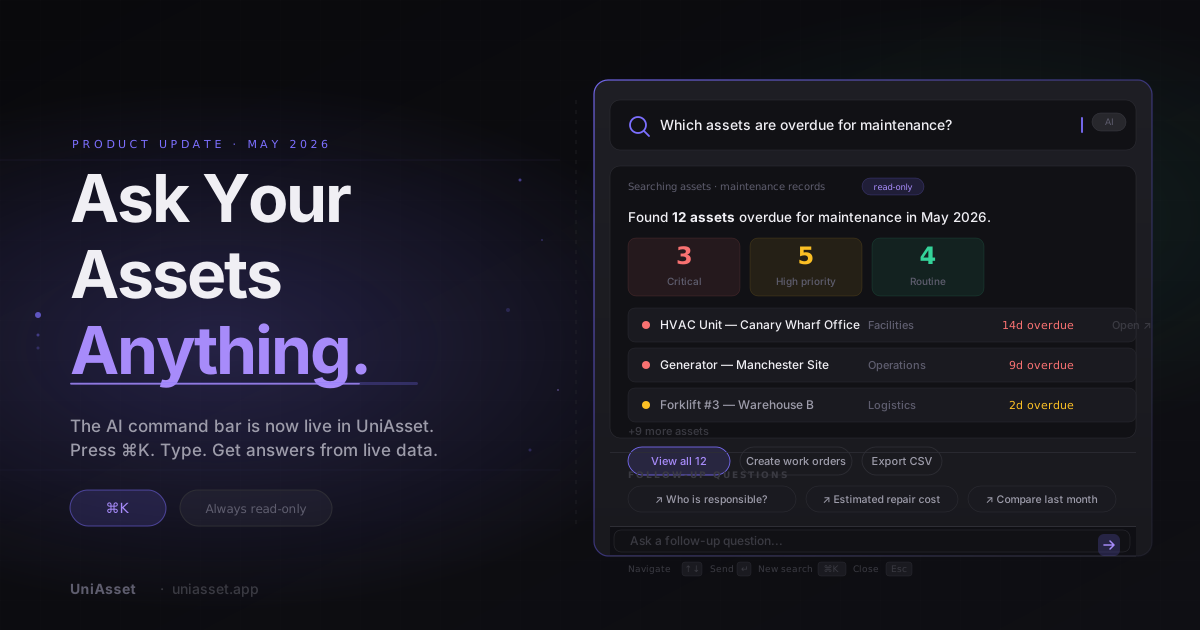
The AI command bar is now live in UniAsset. Press ⌘K. That's all it takes.
There's a question that almost every operations manager, IT lead, and facilities coordinator has asked at some point — not to a colleague, not in a meeting, but quietly, staring at a dashboard that has all the data and none of the answers:
"Why can't I just ask this thing a question?"
Today, you can.
The moment everything changed
Think about the last time you needed to know which assets were overdue for maintenance. Or how much your team spent on repairs this year. Or which warranties were about to expire.
You probably navigated to Reports. Found the right one. Configured the filters. Waited. And maybe — if you got the filters right the first time — you got your answer a few minutes later.
That's too long. Long enough that most people stop asking the question and start making guesses instead. And guesses, repeated across a team, are how maintenance gets missed, warranties lapse unnoticed, and costs become surprises.
The AI command bar closes that gap entirely. Press ⌘K from anywhere in your UniAsset dashboard, type your question exactly as it forms in your mind, and get a real answer — in seconds.
What "a real answer" actually looks like
This isn't a chatbot that summarises a help article. When you ask UniAsset a question, it goes directly to your live operational data and comes back with something structured and actionable.
Ask "Which assets are overdue for maintenance this month?" and you'll see the count broken down by priority — how many are critical, how many are high, how many are routine — followed by a prioritised list of the specific assets, their locations, and how many days overdue each one is. Action buttons let you create work orders or export the list without leaving the bar.
Ask "What's our total maintenance spend this financial year?" and you get the number, the year-on-year comparison, and a breakdown by the categories driving the change.
Ask "Which assets have warranties expiring in the next 60 days?" and you get the list, ranked by urgency, with the most critical expiries at the top.
The answer is never just text. It's the information you actually need, in a format you can act on immediately.
The command bar keeps a conversation thread — so you can go deeper without starting over. Ask about overdue assets, then ask who's responsible for them, then ask for the estimated repair cost. Each question builds on the last.
What this means for your day-to-day
The command bar isn't a single feature — it's a different way of working with your asset data. Here's what that looks like for the people who use UniAsset every day.
For operations managers
Your job involves constant prioritisation. Which maintenance issue needs attention first? Which department is overspending on repairs? Which assets are quietly becoming liabilities?
Until now, answering those questions meant building reports, exporting data, or relying on someone else to pull the numbers. With the command bar, those questions become five-second conversations.
"Which assets have the highest maintenance-to-purchase cost ratio?" surfaces the assets draining your budget before they become a formal problem. "Show me everything overdue in the London office" gives you the list, the priorities, and a direct path to create work orders — in one motion.
For IT managers
Hardware audits, warranty renewals, licence expiries, device assignments — IT asset management is full of time-sensitive information that's easy to miss and expensive to overlook.
"Which devices have warranties expiring this month?" with a prioritised list and a renewal action is genuinely different from the same information buried in a filtered table. The bar surfaces what's urgent, tells you how urgent it is, and puts the action one click away.
"Which assets assigned to the engineering team have no documentation attached?" identifies compliance gaps before an audit finds them for you.
For facilities teams
Facilities management runs on scheduled maintenance. The risk isn't usually that the work isn't getting done — it's that the full picture is hard to see quickly, especially across multiple sites.
The command bar gives you that picture on demand. "Show me all upcoming preventive maintenance across all locations this month" becomes a morning briefing, not a report-building exercise. "Which HVAC units are approaching their service interval?" becomes a two-second check, not a multi-step investigation.
For finance and leadership
When leadership asks about asset costs, the answer usually takes a day to prepare. Not anymore.
"What's our total asset spend by department this year?" is now answerable in a meeting, live, with real data behind it. "Which departments have the highest cost risk across their asset portfolios?" gives leadership a starting point for a capital planning conversation — without anyone having to build a presentation first.
For new team members
There's a benefit that's easy to miss: the command bar is the fastest way to understand your organisation's asset landscape when you're new.
Instead of navigating through menus trying to understand what's where, you simply ask. The questions suggested when you open the bar model how experienced asset managers think about their portfolios. The follow-up suggestions after each answer show you the next question worth asking. It's not just a productivity tool — it's how you get up to speed faster.
Your data stays yours — completely
The AI command bar is permanently read-only. It surfaces your data and helps you understand it, but it cannot change, delete, or create anything. That's not a setting — it's how the feature works.
The bar only ever shows you what you already have access to. Employees see their assigned assets. Managers see their team's portfolio. The same access controls that govern the rest of UniAsset apply here exactly the same way.
Your data never reaches another organisation. Another organisation's data never reaches you. Your asset intelligence stays exactly where it belongs.
A conversation, not a lookup
The most important thing to understand about the command bar is that it's designed as a thread, not a one-shot query.
Each question builds on the last. Ask about overdue assets, then ask who's responsible for the most critical one — the bar remembers the context. You stay in the flow. Nothing gets lost.
The follow-up suggestions after each answer aren't random. They're the questions that naturally follow from what you just learned. Clicking one fills the input so you can read it, edit it if you want, and choose whether to send it. Nothing fires without you deciding it should.
What's coming next
The command bar is the beginning of something bigger.
The next step is a contextual AI panel — the same intelligence, available as a slide-in on specific pages. On the assets list it will surface questions relevant to what you're looking at. On the executive dashboard it will surface financial summaries and portfolio-level insights. UniAsset will know where you are and bring the right information to you, rather than waiting for you to ask.
Further ahead: proactive intelligence — UniAsset noticing things worth your attention before you think to ask. An asset approaching a cost threshold. A cluster of maintenance issues across one location. A compliance gap forming in a document category. Not alerts that interrupt your day, but insight waiting for you when you need it.
The goal is simple: UniAsset should feel less like a system you manage and more like a colleague who knows your operations — and who always has the answer ready.
Try it now
Press ⌘K.
A bar will appear. Four questions will be suggested — the ones most relevant to your role and your current data. Click one, or type your own.
Somewhere in your organisation right now, there's a question you've been meaning to look into. Something you've been putting off because you knew it would take too long to find the answer.
It won't take long anymore.
Something the bar couldn't answer? A question you wish it understood? We want to hear it →
The AI command bar is live now on all UniAsset plans. No setup, no configuration, no training required. Press ⌘K from anywhere in your dashboard to get started.
Related articles
The $47,000 Compressor That Didn't Have to Die
Most HVAC failures aren't equipment problems. They're information problems. Here's how HVAC businesses are stopping the cycle of reactive chaos — and what it looks like when they do.
How UniAsset Is Building Enterprise IoT Asset Intelligence
An engineering-led look at how UniAsset's IoT Signal foundation is architected: ingestion, storage, tenant isolation, and the road from visibility to automation.
UniAsset Now Supports 6 Depreciation Methods — Every Major Standard, In One Place
UniAsset now calculates asset depreciation using SLM, WDV, Declining Balance, Double Declining Balance, MACRS, and Sum of Years' Digits — automatically, per asset category, for every asset in your portfolio.
SLM vs WDV vs Double Declining Balance: Which Depreciation Method Is Right for Your Assets?
Three depreciation methods. Three completely different book value curves. One choice that affects your taxes, your audit, and your financial reporting. Here is how to pick the right one.
Understanding Total Cost of Ownership for Enterprise Assets
Learn how to calculate and analyze Total Cost of Ownership (TCO) for physical assets. Move beyond purchase price to understand true asset costs and make better procurement decisions.
Ready to put this into practice?
Start tracking your assets, scheduling maintenance, and gaining operational insights today.